
Room Booking+
Room Reservation Software: Making Efficient Use of Capacity
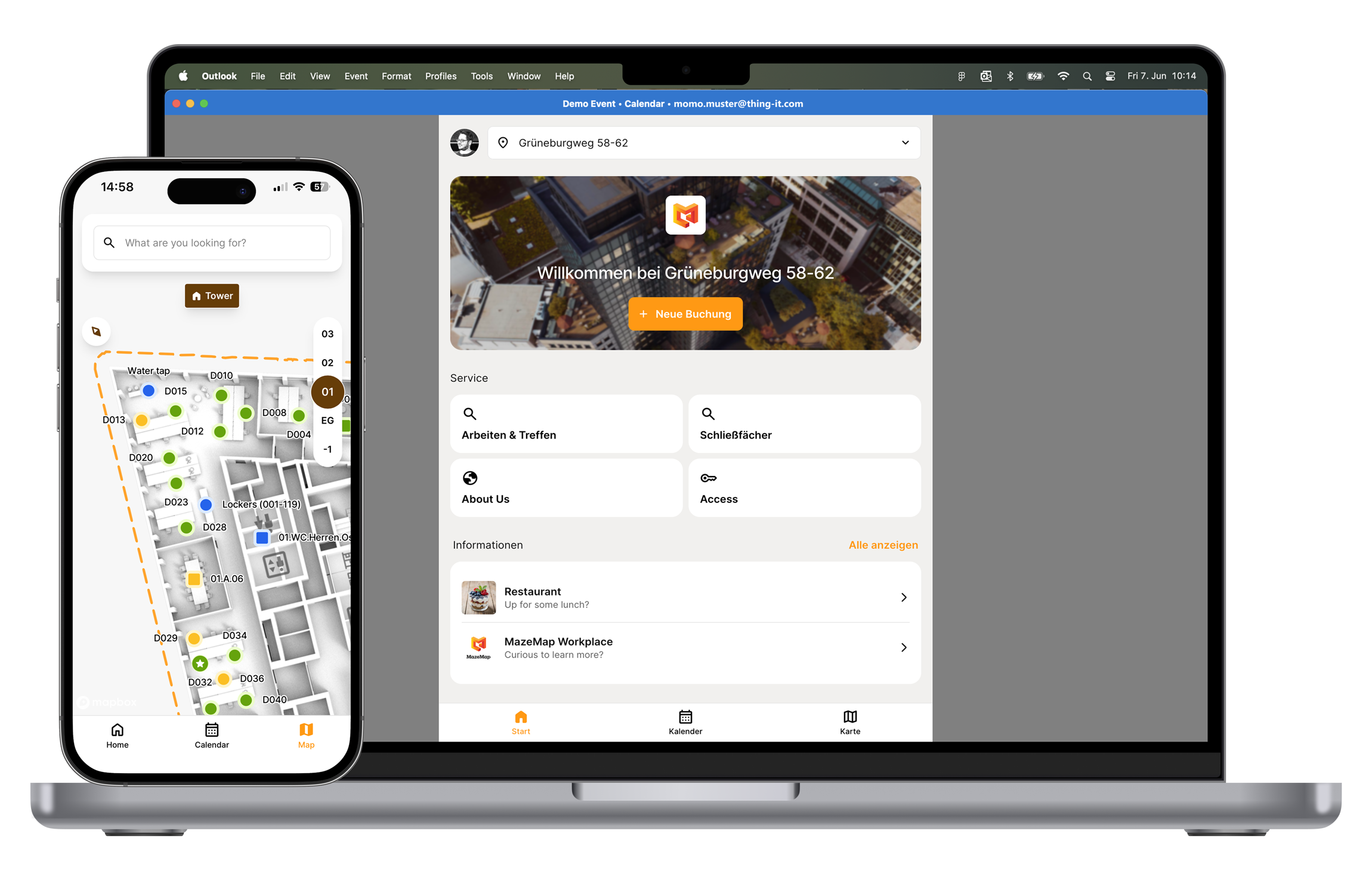
With MazeMap Workplace room booking software, you can manage meeting rooms efficiently and user-friendly—right in Outlook.
Hybrid working increases the need for flexibly bookable conference rooms as well as transparency of capacities and usage behavior. Our smart room booking software ensures a smooth user experience and optimal utilization of available resources.
The Benefits of Room Booking Software
Optimized land use
through data-driven analysis of sensor-based usage data

User-centered and efficient
Thanks to the simple room booking tool and auto-checkout for maximum resource availability

Flexibility and user-friendliness
Thanks to seamless Outlook integration.
Enterprise Readiness
thanks to easy implementation and integration into existing systems

“Particularly noteworthy are the flexible configuration options with the ability to book additional options (catering, equipment, etc.) and the option of automatic release in the event of no-shows.
Markus Kluck
Head of the Digitalization Expert Team, Drees & Sommer

Features of Our Room Booking Software
The smartest room booking software

Find what you need near you at
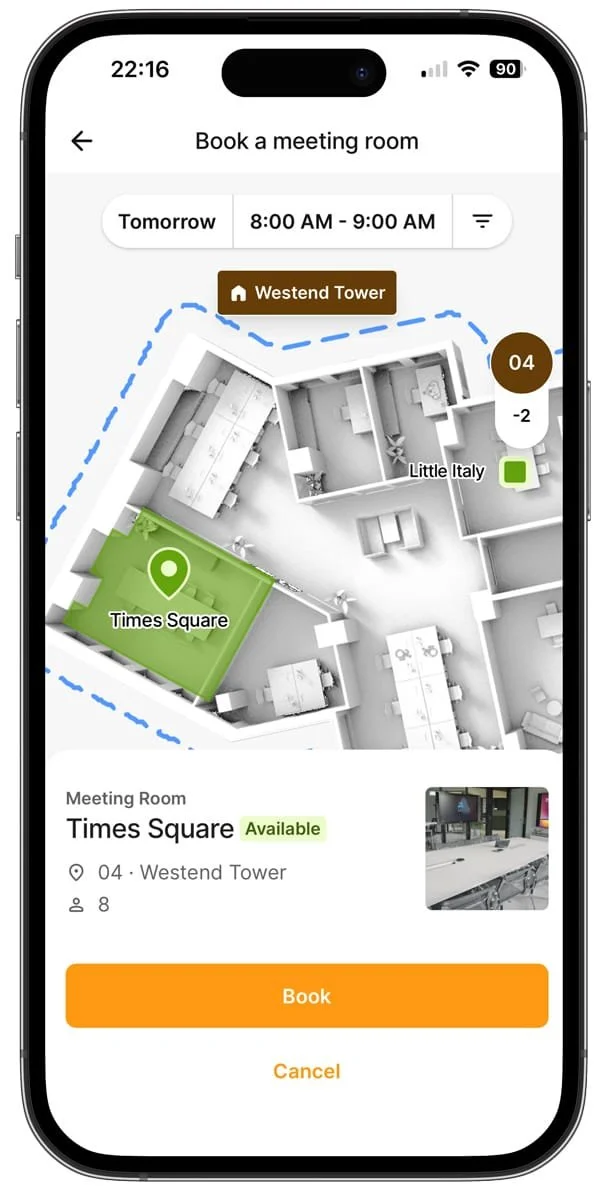
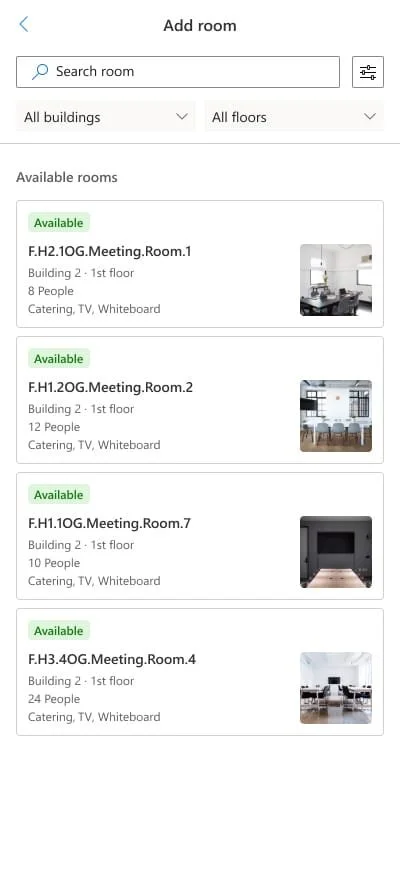
Our sensor-driven analysis and enterprise readiness make the room booking tool a breeze to use. With just a few clicks, you can find a room that meets your requirements. Our intuitive platform offers a wider selection of rooms that you can book immediately. With auto-checkout and the option to automatically make free resources available again, you can optimize the use of workspaces and create a collaborative atmosphere for your teams.

Transparent management of your building locations
Our platform solution is designed for use in companies and can be seamlessly implemented across multiple locations. The MazeMap Workplace Dashboard provides a clear overview of booking details for all buildings. Our user-centered technology allows you to keep track of user behavior and simplify your space management.

Use
Microsoft 365 and
Your groupware
Our app and dashboard offer multi-client user and permission synchronization for easy management of your workspace. Thanks to our open API integrations, you can use our room booking system directly in Outlook. This means that Outlook remains your familiar booking environment, while our intelligent features increase convenience and productivity.
Efficient check-in solutions for your meetings
Optimize your day with simple check-in solutions: scan a QR code or use NFC to confirm your booked meeting room upon entry. Our smart sensors ensure that reserved but unoccupied spaces are automatically released again. This ensures that all workspaces are used optimally.
Room reservations and
catering in one step – seamlessly integrated
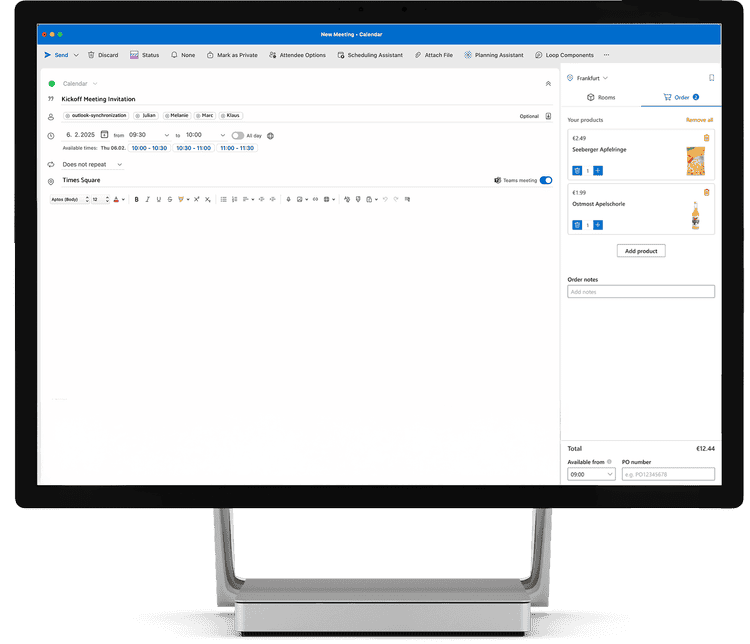
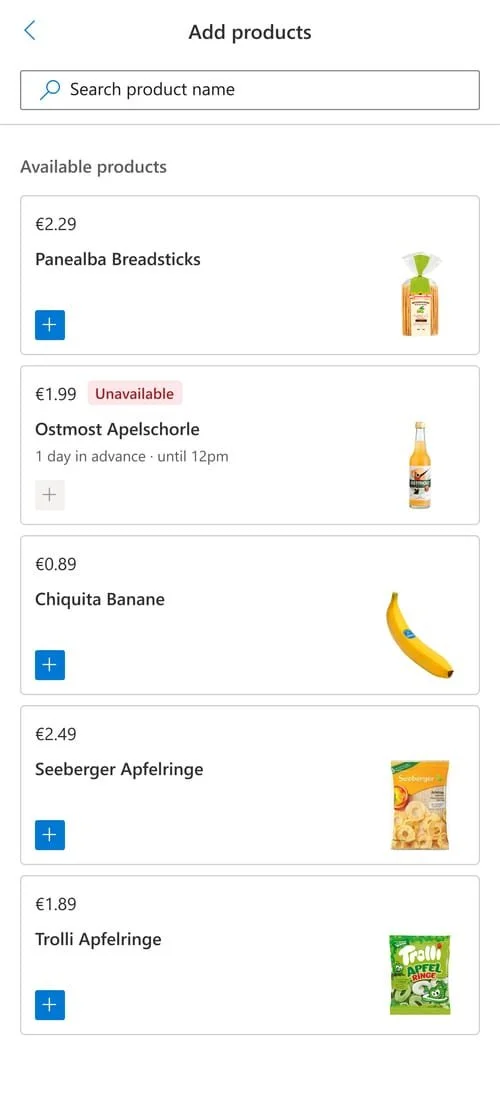
Our catering management for Outlook enables easy organization and smooth execution of meetings, including catering. Caterers can create products in their own shop, including additional information such as minimum order quantities or preparation times. Users are guided step by step through the simple ordering process and can choose from the range on offer. The necessary set-up and dismantling times are automatically taken into account when searching for and booking rooms.

Personal Room booking software Live Demo
Your Workplace
is not a demo case.
Your setup is too complex for standard solutions.
A typical demo only shows simple use cases —and quickly gives a misleading impression of what’s really possible.
That's why we don't offer a generic trial version, but rather a personalized live demo.
Schedule your free, no-obligation demo today.

Lisa Pfützner
Workplace Strategist
Book rooms and catering at
in one step
For greater productivity in your everyday work.
With our solution, organizing meetings becomes a breeze: book rooms and order catering—all in one step, with our add-in directly in Outlook.
This saves time, reduces sources of error, and creates smooth processes in everyday office life.
Get to know our add-in now and simplify your work processes the smart way.
All-in-one platform for booking+
MazeMap Workplace is the only all-in-one platform on the market that offers comprehensive booking+
Smart features complement the comprehensive booking functions and ensure:
a perfected user experience
the balance between space efficiency and employee satisfaction
an increase in employee productivity



Take advantage of our room booking service+
Fully integrated catering ordering through our Outlook add-in
Catering can be conveniently ordered when booking a room in Outlook, so that the system automatically takes into account the caterer's preparation time and books the room for a longer period accordingly.
Location-based guidance
Indoor navigation makes it easier to find rooms or devices. QR codes provide access to helpful information such as Wi-Fi passwords and operating instructions.
Additional capacity through sensor-based analysis
By comparing bookings and actual usage, no-shows are identified and meeting rooms are made available for new bookings.
Central room control without switches
Whether it's lighting, temperature, or blinds—everything can be conveniently controlled via the app.
Bring your workplace strategy to life with Booking+ from MazeMap Workplace!

Expert knowledge on room reservation software
Want to create inspiring, flexible, and modern work environments? Our expert Sebastian takes the HR perspective and shows how you can use sensor technology, data visualization, and iterative optimization to make informed decisions and create work environments that really work.
Watch the recording of our webinar "From gut feeling to data-driven decisions – How HR creates modern working environments" and delve deeper into the topic.






Integrations
One platform -
compatible with all systems
Meeting rooms are booked but empty?
Connect Outlook, room resources, and services on a single platform –
– and reduce no-shows, double bookings, and unnecessary coordination.
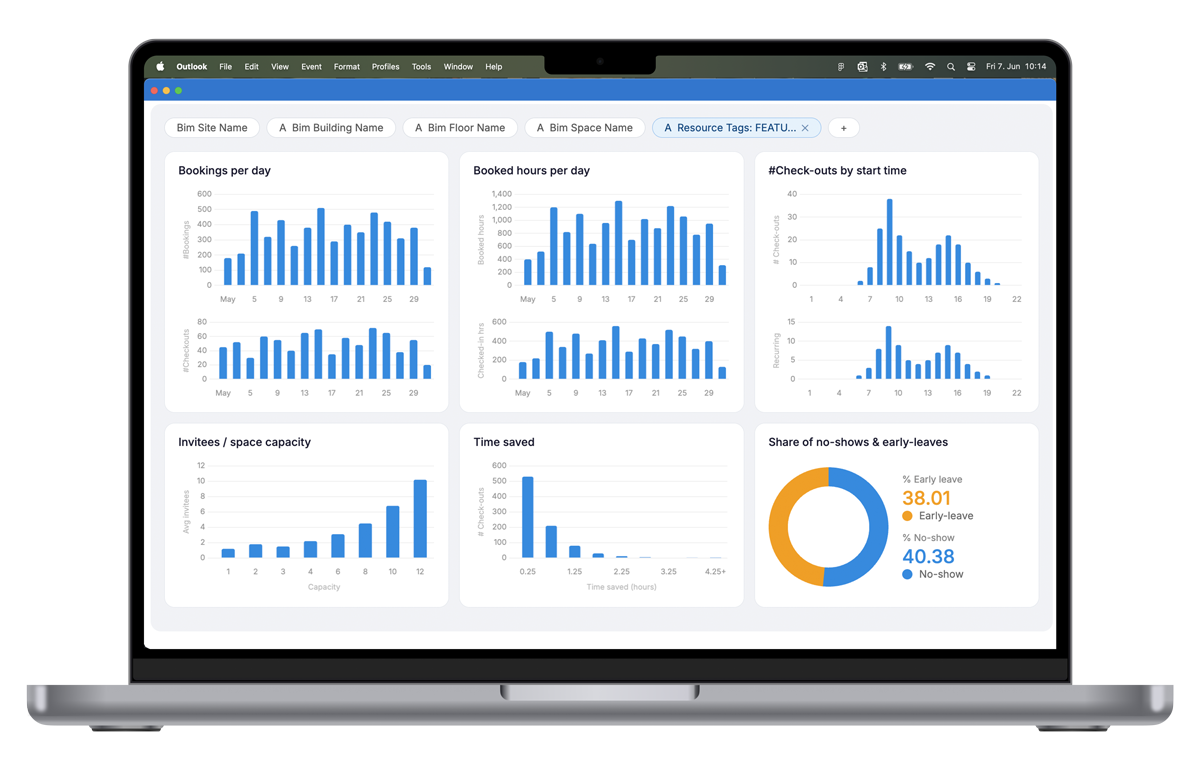
Efficient land use through sensor-based data
In the area of data centering, the focus is on the efficient management and operation of office space. Through the intelligent evaluation of sensor data and automatic checkout systems, capacities can be freed up for spontaneous bookings, making more bookable rooms available without additional construction work. This enables flexible use of free space.
Identifying actual needs is based on the chosen working model and the definition of when an office is considered to be at full capacity, as well as on the analysis of room and group sizes to ensure that room sizes meet requirements.
The integration of usage data into internal company systems and dashboards enables comprehensive, sensor-driven usage analysis, which leads to the creation of a detailed data cube and provides deep insights into space utilization. This data-driven approach promotes both efficiency and flexibility in space management, as well as cost optimization and employee satisfaction.
Room Reservation Software Analytics
MazeMap Workplace offers the most comprehensive solution on the market
Room booking is an integral part of MazeMap Workplace's comprehensive all-in-one platform. By covering all booking scenarios, it supports hybrid working models and sustainably increases efficiency and productivity.

Offer your employees maximum flexibility with intuitive desk booking in just a few clicks.

Smart solutions to efficiently allocate your parking spaces and optimize utilization.

Space for personal belongings:
Book, use, and manage lockers via app.
Safe navigation across the entire campus: quickly find who or what you are looking for.
Global organizations that trust us










Get started now with
MazeMap Workplace
Contact us today. We’ll get back to you shortly. You’re also welcome to schedule a demo right away.
Call us at
+49 (69) 566086786

No-obligation demo
Book an appointment now
You can count on MazeMap Workplace
Easy integration: Seamless integration into existing systems.

High usability: user-friendliness and intuitive operation.
Robust security standards: Maximum security for your data.



Frequently asked questions
-
Room booking software—also known as a room booking system—is a digital solution that enables companies to centrally manage and book conference rooms, meeting rooms, and other workspaces. It displays room availability in real time, prevents double bookings, and integrates directly with existing tools such as Microsoft Outlook or Microsoft 365. This allows employees to book rooms without leaving their familiar work environment—including automatic calendar entries, resource management, and usage analytics for efficient space management.
-
Don't worry about unclaimed bookings anymore: if no one shows up, our software will release the space after ten minutes and mark it as available.
-
Our solution is fully compatible with iOS and Android. Users can easily download the app from the Apple Store or Google Play.
-
From BYOD and store downloads to corporate mobile device or application management with Apple Business Manager, the Google equivalent of ABM, Microsoft Intune, or Mobile Iron.
-
Yes, with MazeMap Workplace, you can keep track of space utilization across your entire office premises—from your meeting rooms to your parking lots. With your sensor-based workplace analytics, making data-driven space decisions has never been easier.
-
With our animated heat maps, you can monitor room occupancy in real time. Make data-driven decisions and proactively resolve conflicts, such as unoccupied or overbooked rooms: Discover our Occupancy Analytics feature now.