April 23, 2026 – 7 min read
Workplace Booking System: Benefits, Features, and Selection Criteria
A workspace booking system provides greater transparency, planning reliability, and efficiency in hybrid work environments. It reduces search times, makes it easier to use workspaces, rooms, and parking spots, and at the same time improves the day-to-day office experience for employees. Find out why modern booking solutions do so much more than just serve as reservation tools.

Head of Marketing

What is a workstation booking system?
A workspace booking system is software that allows employees to digitally reserve desks, meeting rooms, parking spaces, and other office resources—in real time, via an app, browser, or calendar integration. It replaces fixed seat assignments with a flexible, transparent booking model that is ideally suited to hybrid work models.
Companies use such systems to utilize their office space more efficiently, provide employees with planning certainty, and at the same time gather valuable usage data for space management.
This is how a workstation booking system promotes greater organization, efficiency, and satisfaction
Hybrid work has now become part of everyday life in many companies. This work model is also changing the requirements for space management and the organization of resource utilization. Workstations, meeting rooms, and parking spaces are now often shared to make more efficient use of office space. Anyone who wants to maintain or even optimize the workplace experience should focus on two factors: transparency and planning certainty—for both management and employees.
This is exactly where a workspace booking system comes in. Holistic systems help companies make resource utilization predictable, avoid unnecessary time spent searching for spaces, and even improve dynamic space management. In doing so, they support a smooth hybrid workday and boost motivation and productivity.
Below, we explain why a modern workplace booking system is much more than just a digital reservation tool today.
What are the benefits of a workstation booking system?
When employees were required to be in the office every day, it was always clear who sat where. In hybrid models, things are different: on some days the office is busier, on others much quieter, but it’s rare for everyone to be there at the same time. To improve space efficiency, many companies are reducing the number of available workstations, meaning they are no longer permanently assigned.
Without clear processes, this quickly leads to uncertainty, planning difficulties, or even frustration among employees. Where is there still an open space? Which meeting room is available at 10 a.m.? Where is my team sitting today? A workspace booking system provides reliability here—especially when resources are scarce. Employees can plan their workday in advance or quickly and easily find and use the resources they need at short notice.
This reduces friction in day-to-day operations and ensures that office space is not only available but also used effectively.

Which accounting solutions increase efficiency and reduce stress in the day-to-day work routine?
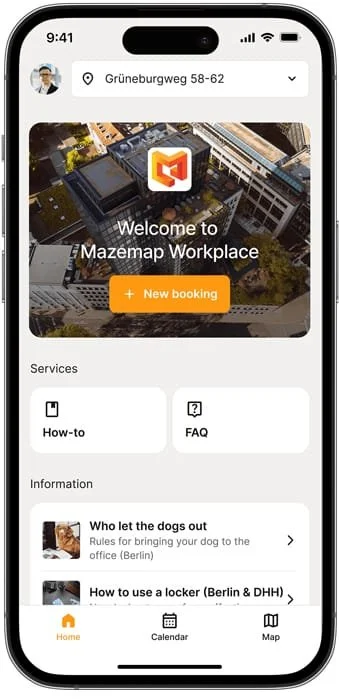
A good booking system not only saves time on administrative tasks but also in the day-to-day work of every employee. Reservations should be possible with just a few clicks, whether for a desk, a meeting room, or a parking space.
Spontaneous changes are particularly common in modern work environments. A project meeting is scheduled at short notice, a team shows up at the office unexpectedly, or an external appointment is rescheduled. When availability is visible in real time, such situations are much easier to resolve.
Here’s a practical example: Instead of walking through several floors in the morning to find an open desk, an employee can reserve their workspace the day before in just a few seconds using an app. This saves time and prevents unnecessary stress at the start of the day.
Productivity and convenience thanks to transparent availability
One of the biggest advantages of workplace booking systems is the clear overview they provide. Employees can see at a glance which spaces are currently available, which have already been reserved, and what options are still available for a specific day or time.
This isn’t just convenient—it also improves collaboration. When colleagues know when and where team members are in the office, they can plan joint office days more effectively. Teams can better coordinate their schedules and more easily incorporate in-person meetings into their daily office routines.
This transparency is especially crucial in larger organizations with multiple floors, buildings, or even locations. After all, the more complex the work environment, the more important it is to have a system that helps people find their way.
How do workplace booking systems help people find their way around the office?
Searching means wasted time and stress. The larger the building, the more important it is to be able to find your way around. After all, simply reserving a workspace doesn’t necessarily increase efficiency and comfort. Where exactly is the workspace located? In which part of the building is the meeting room? Where is the project team sitting today?
Modern booking solutions therefore go beyond simple reservations. Digital maps, floor plans, and navigation features help users locate resources quickly. This is a real advantage, especially in large corporate spaces and multi-building locations. But for new employees or guests as well, navigation features and digital maps are a welcome addition to comprehensive workplace booking systems.
If, for example, an employee can use an app to navigate directly to their reserved workstation, this has a positive impact on productivity and the user experience.
Integration into existing systems rather than additional standalone solutions
A workstation booking system is most effective when it integrates seamlessly with existing applications. Integration with popular calendar and communication tools is particularly important.
When users can manage bookings directly within their familiar environment, they work more efficiently and adopt new processes more quickly. When reservations are automatically displayed in the calendar, the risk of double bookings, misunderstandings, or missed appointments is reduced. At the same time, resource management remains centrally organized, and changes are synchronized in real time.
For businesses, this means: no unnecessary parallel processes, no duplicate data entry, and significantly less administrative work. But be careful: not every workstation booking system offers true integration.

More than just a room reservation: When reservation systems take follow-up processes into account
A modern booking system does more than just handle room reservations. Many companies benefit greatly when related processes are integrated into the system as well.
A typical example is meetings that require not only a room but also catering. When additional steps, such as catering management, can be incorporated directly into the booking process, there are fewer coordination loops and fewer errors. Modern workplace booking systems cover these additional services.
Instead of notifying multiple parties individually, the event is initiated centrally within the system. Requests for changes can be made directly and automatically forwarded, and the necessary preparation time is automatically factored into the room reservation. This reduces the workload for both organizers and service providers.
Reliable data for employees and management
Many companies have valuable office space but have limited insight into how it is actually being used, which makes efficient space management difficult. A workspace booking system combined with sensor technology can provide a crucial data and decision-making foundation for designing office spaces to meet actual needs.
Analyses of occupancy rates, booking patterns, and peak usage times reveal which areas are in high demand and when, and which spaces remain underutilized on a long-term basis. These insights are particularly valuable to management for adapting space planning strategies, planning resources with employees in mind, and making well-founded investment decisions. At the same time, they help identify opportunities for cost savings without compromising the quality of work.
In addition, real-time information based on bookings and sensors allows employees to track resource availability at any time. This enables efficient use of resources and saves time, as everyone can see at any given moment whether and where desks, whiteboards, printers, or meeting rooms are available.
Custom rules ensure fair and efficient use of resources
Not every resource should be available for booking without limits or guidelines. Especially when capacity is limited, a set of rules can help ensure fair use.
In a modern workspace booking system, such rules can be implemented and flexibly customized. For example, companies can specify how long parking spaces may be reserved, how many bookings are allowed per week, or which workspaces are assigned to specific teams. Additionally, priorities can be defined for certain user groups.
With the help of sensor data, resources that have been reserved but remain unused can be released after a certain period of time.
All of these rules increase acceptance of the system and ensure that resources—distributed fairly—are available where they are truly needed.
Scalability and Integration as Key Success Factors
The workplace is constantly evolving. New locations are added, teams grow, office spaces are reorganized, and existing systems are expanded. That is why modern workplace booking systems must not only meet current needs but also be able to grow dynamically alongside the company over the long term.
What matters here is not only technical scalability but also practical feasibility. A solution should be able to integrate into existing system environments and should not force companies to undergo costly migration processes. A successful rollout is equally crucial: the solution will only deliver its full value if employees understand it and are happy to use it in their daily work.
The key to this is the combination of user-friendliness, integration, dynamic and needs-based customization, and accompanying change management.
What should you look for when choosing a workstation booking system?
Not every system is right for every business. These five criteria will help you make the right choice:
1. Intuitive app and quick onboarding
A booking system only works if employees actually use it. That’s why it’s crucial to have an interface that’s intuitive enough to use without training—both in the mobile app and in the desktop version. If people can book their desks with just a few clicks, they’ll do it every day. If they have to navigate through a series of menus first, they’ll avoid using it.
2. Self-checkout and smart availability management
Ghost bookings—that is, reserved but unused desks—are one of the most common problems with desk-sharing models. An auto-checkout feature automatically releases booked desks when they are not in use. This significantly increases actual availability without requiring any manual intervention.
3. Finding Colleagues and Team Bookings
Hybrid work thrives on intentional presence. A good system not only shows available seats but also where colleagues are sitting—and allows you to book a spot specifically next to your own team. This makes spontaneous collaboration easier to plan and strengthens team cohesion without anyone having to send messages to find out who’s coming into the office and when.
4. Flexible Roles, Permissions, and Enterprise Readiness
Larger companies require differentiated user roles: Who is authorized to book which areas? Which teams have reserved zones? How are guest users handled? Make sure the system supports flexible role and permission management—and can be integrated into your existing IT infrastructure via AD 365, Azure Active Directory, or a SCIM-compatible system.
5. Data Protection and GDPR Compliance
A booking system processes personal usage data—such as who is sitting where and when. This is subject to the GDPR. Verify that the provider can demonstrate compliance with data protection regulations, determine where the data is stored, and confirm that security standards such as ISO 27001 are certified. Employees are much more likely to accept the system if there is transparency regarding how the data is used.
Conclusion: In hybrid work models where resources are scarce, a workstation booking system promotes efficiency and satisfaction
Hybrid work requires reliable structures. Companies that want to provide flexible access to workstations, spaces, and other resources need a system that combines transparency, predictability, and efficiency.
A modern workplace booking system like the one offered by MazeMap Workplace is not just a simple reservation tool; it improves the entire office experience—from providing employees with planning certainty and wayfinding to enabling demand-driven space planning. By boosting efficiency and satisfaction, this supportive system becomes a strategic business advantage.
Those who want to successfully create flexible work environments can lay the groundwork by implementing a customized, modern workspace booking system.
Discover Booking+ from MazeMap Workplace and improve both your employees’ hybrid work experience and the efficient use of your resources.
Frequently asked questions
-
A workspace booking system is software that allows employees to digitally reserve desks, meeting rooms, parking spaces, and other office resources. It is primarily used in companies with hybrid work models to manage shared spaces transparently and efficiently.
-
Employees can select an available desk or room via an app, a web browser, or directly in Outlook and reserve it for a specific time period. The system displays real-time availability, synchronizes bookings with the calendar, and automatically releases resources after unused bookings.
-
It is particularly well-suited for companies with hybrid work models, where not all employees are on-site every day. Typical use cases include large corporations with desk-sharing programs, as well as growing medium-sized businesses that want to use their office space more efficiently.
-
Costs vary depending on the provider, feature set, and number of users. Most solutions are billed as a SaaS license per user per month. The key factors are not only the license price, but also the implementation effort, integration costs, and the long-term ROI resulting from more efficient use of space.
-
Good systems offer native Outlook integration as an add-in, allowing employees to make bookings directly from their calendar. Bookings are automatically displayed and synced in the M365 calendar—without the need for additional tools or portals.
-
A basic room booking system manages only meeting rooms. A comprehensive workspace booking system also covers desks, parking spaces, lockers, and other resources—ideally on a single platform that includes analytics, rules, and indoor navigation.
-
That depends on the system size and integration requirements. Simple setups can be implemented in just a few days. More complex rollouts involving multi-site configurations, sensor integration, and change management typically take four to twelve weeks.
Latest Posts

Workplace Management in the Hybrid Office: What You Really Need
Workplace management is no longer a niche topic. For companies with hybrid work models, it has become a core operational task—and, at the same time, one of the most complex.

Digital parking space management: How to finally make efficient use of unused space
For many employees, finding a parking space in the morning is a daily source of stress—even though there is often unused space available. The problem is usually not a lack of parking spaces.

Desk Sharing in the Office: Why It Often Fails—and How to Make It Work
Desk sharing —that is, the flexible sharing of workspaces in the office—has become established in German companies as a response to hybrid work models.
Are you
curious?
Contact us today using the form. We’ll get back to you shortly.
Or book a demo appointment directly :
Free & no obligation

Tailored specifically to your situation, rather than a standard demo
Book a no-obligation demo today!

Lisa Pfützner
Workplace Strategist

Give us a call
+49 69-566086786