April 30, 2026 – 7 min read
Hot desking, desk sharing, or desk booking—which option is right for your office?
Hot desking, desk sharing, desk booking—these terms are constantly being used interchangeably. Yet they describe three distinct concepts: two workplace models and a software category. Confusing them leads to poor decisions—and you won’t realize it until employees start complaining or space efficiency plateaus.
This article clears up the confusion. You’ll learn what distinguishes these three concepts, which model is best suited for which type of business—and what you should keep in mind when putting them into practice.

Head of Marketing

Three terms, three concepts—the difference makes all the difference
Before we get into the details, here’s the shortest possible explanation:
Hot desking is a workplace model that offers maximum flexibility: whoever arrives simply finds an open seat.
Desk sharing is a structured workspace model: multiple employees share desks according to set rules.
Desk Booking is a software solution that makes both models scalable and efficiently manageable, particularly in larger or hybrid organizations.
Hot desking and desk sharing are, therefore, organizational concepts. Desk booking is the technical system that makes them manageable. At first glance, this distinction may seem theoretical—but it is the difference between an office where sharing works and one where it fails.
What is hot desking?
Hot desking refers to a workplace concept in which there are no assigned desks. Employees choose their seating spontaneously—depending on the task at hand, their mood, or available space. Sometimes by the window, sometimes near the team, and sometimes in a quiet area.
The term originally comes from a maritime context: on submarines, "hot bunking" referred to the practice of several crew members taking turns sharing the same bunk. Applied to the office: if a desk is still warm, the next person takes it right away.
A key feature of hot desking is the ability to choose a workspace based on the situation. There are no reservations in the traditional sense, no assignment to specific teams, and no designated areas. This creates flexibility—but it also presents challenges when more people want to come into the office than there are available seats.
In many modern offices, however, hot desking is combined with booking systems. Employees don’t just choose their workspace on the spot; instead, they reserve it in advance via an app or platform.
What is desk sharing—and how does it differ from hot desking?
Desk sharing is the more structured version of hot desking. Here, too, several employees share workspaces instead of having assigned desks. The key difference: there are rules.
With desk sharing, workstations are typically booked in advance. There are defined sharing ratios (e.g., one desk for every three employees), team zones, priority rules, and clear booking windows. This makes the system easier to plan—both for employees and for space management.
Which model is a better fit depends on your company's specific circumstances:
Hot desking works well in dynamic environments with highly variable attendance, smaller teams, and a high tolerance for spontaneity—typical of tech startups, agencies, or field sales teams.
Desk sharing works well in larger organizations with hybrid models, where employees are in the office regularly—but not every day—and expect predictability.
In practice, the lines are blurred. Many companies start with hot desking and evolve it into a desk-sharing model as soon as attendance increases and more structure becomes necessary. You can read more about the typical pitfalls in our article “Desk Sharing in the Office: Why It Often Fails—and How to Make It Work.”
Where does Desk Booking fit into the picture?
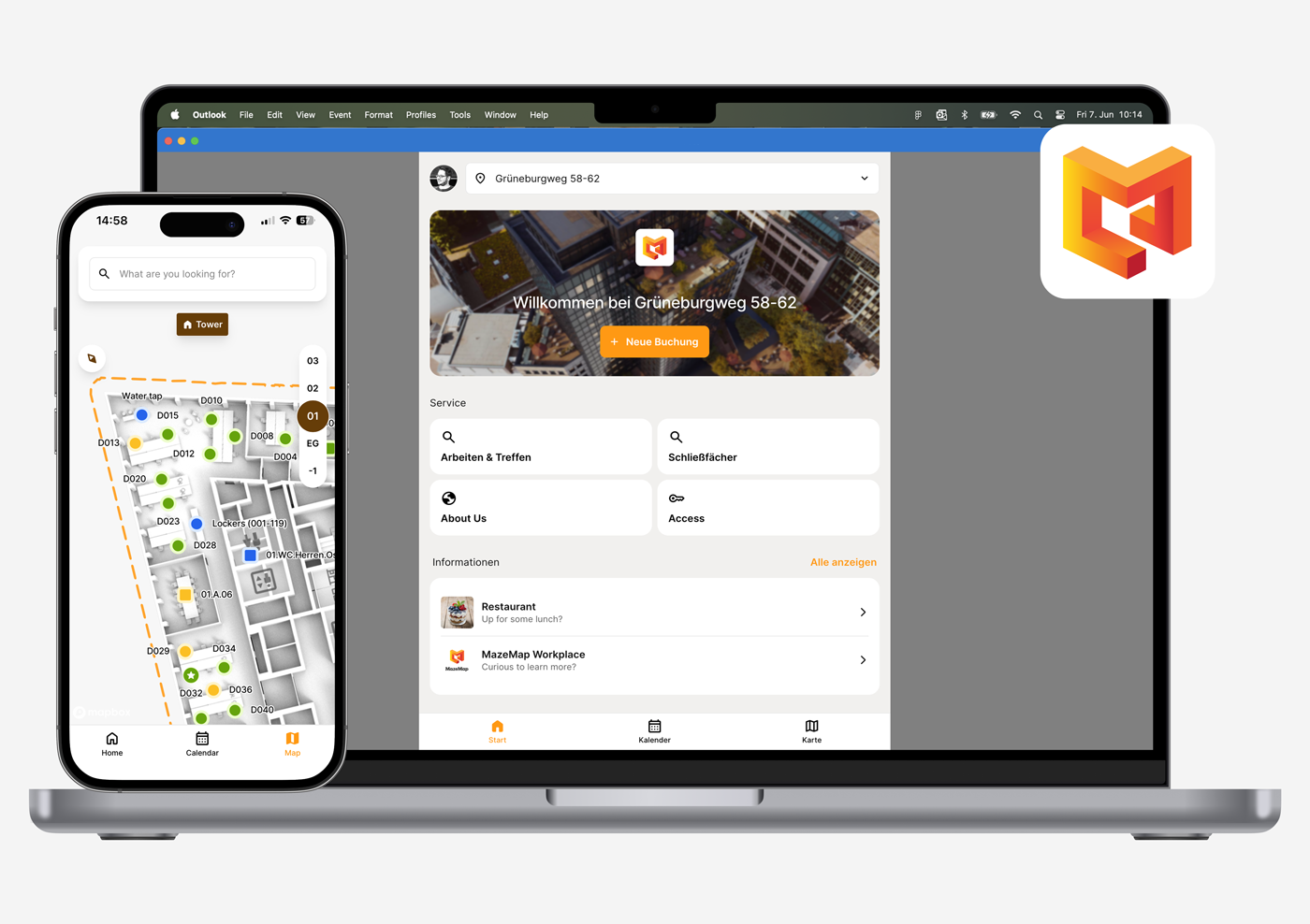
Hot desking and desk sharing are models. Desk booking is the system that makes them manageable—from booking and policy management to analytics and user guidance.
Desk booking software performs three tasks:
Transparency - Employees can see in real time which seats are available, which have been reserved, and where their colleagues are sitting.
Controls - Administrators can define rules: Who is allowed to make reservations, and when? Which areas are reserved for which teams? How far in advance can reservations be made?
Data Set - Real-world usage data shows whether your sharing concept is working or needs to be adjusted.
Without these three features, it is often difficult in practice to operate a sharing model—whether hot desking or desk sharing—efficiently and reliably. The IAG study on desk sharing confirms this: In practice, it often becomes clear that the problem isn’t the model itself, but rather the lack of transparency and control without the right tools. In smaller teams, hot desking can work even without specialized software. However, as organizations grow and adopt hybrid work models, a booking system quickly becomes indispensable in practice.
For more information on selection criteria and features, see our guide, " Workstation Booking System: Benefits, Features, and Selection Criteria."
Comparison Chart: Hot Desking vs. Desk Sharing vs. Desk Booking
| Criterion | Hot Desking | Desk Sharing | Desk Booking |
|---|---|---|---|
| What is it? | Workplace model | Workplace model | software |
| Assigned seats? | No | No | Not applicable |
| Book in advance? | Optional, often spontaneous | Often yes, depending on the model | Allows booking |
| Flexibility | Very high | Medium | Configurable |
| Planning certainty | Low | High | High |
| Suitable for | Dynamic teams, small offices | Large hybrid companies | Both models |
| What it solves | Maximum spontaneity | Fair allocation of scarce land | Control & Transparency |
| What it takes | Clear rules, software | Regulations, software | Sensors & IT Integration |
Which model is right for your business?
The right choice depends on four factors:
1. Attendance rate. How many employees are on-site on average? Hot desking works well when attendance fluctuates significantly and remains below 40%. When attendance is consistently between 50% and 80%, desk sharing is easier to plan.
2. Team structure. Do your teams work on a project basis with frequently changing team compositions? If so, hot desking is the right choice. Are your teams stable and do they regularly come into the office together? If so, you need team zones—and therefore desk sharing.
3. Industry and data protection requirements. In sectors that handle confidential data—such as banking, healthcare, and law firms—assigned or at least reserved workstations are usually mandatory. Hot desking is rarely feasible in these settings.
4. Corporate culture. How much room is there for spontaneity? Do employees prefer clear structures or flexibility? Cultural fit determines whether the system is accepted or circumvented.
An honest answer to these four questions will save you months of using the wrong tools and dealing with frustrated employees.

Advantages and Disadvantages of Hot Desking in an Enterprise Context
Hot desking isn't right for every situation. This honest assessment will help you decide:
Advantages
Lower space costs due to a reduced number of desks
Greater flexibility for employees in choosing where to work
Promoting cross-team collaboration by rotating seat assignments
Efficient use despite significant fluctuations in attendance
Quick adaptation to growing or shrinking teams
Disadvantages
The stress of searching when the place is crowded—first come, first served
Lack of a point of reference —many employees miss having clear structures
Data Protection Issues in Confidential Activities
Noise and distractions caused by constantly changing neighbors
Greater difficulty in building team cohesion
Studies show that a significant proportion of employees still prefer a dedicated workspace. That’s why hot desking doesn’t just work “on its own”—it requires clear rules, effective tools, and open communication.
What you need to make hot desking work
To keep hot desking from becoming a source of frustration in your daily routine, you need five key elements:
1. Hot-desking software with automatic checkout Ghost bookings—seats that have been reserved but not used—are the biggest problem in any shared workspace model. Automatic checkout releases these seats after a short period of time.
2. Integration with your existing IT infrastructure. Employees are much more likely to adopt new tools when they can log in via single sign-on and user management is automated through Azure AD or SCIM. This reduces both training requirements and IT support tickets.
3. Sensor-based usage data. Sensors detect whether a space is actually being used—regardless of whether it has been booked. This provides transparency and serves as the data foundation for optimizing your sharing model over the long term.
4. Open-space and clean-desk policies. Employees without assigned desks need secure storage for their personal belongings. In addition, a clear clean-desk policy ensures that every workstation is immediately ready for use.
5. Indoor navigation. In large buildings, a digital map helps people quickly find reserved seats, colleagues, or meeting rooms. This significantly reduces the stress of searching—especially for new employees and guests.
For more detailed instructions on how to implement this in practice, see our article "Desk Reservations in a Hybrid Office: How It Works and What Matters."
Case Study: How a Large Company Transitioned from a 1:1 Ratio to a Flexible 3:1 Ratio
A good example of the successful implementation of a flexible work model is a large international company.
The situation: Following a relocation, the company suddenly had about 40% less office space available while retaining the same number of employees. The old model—fixed desks in a 20-story building—was therefore no longer feasible.
The implementation: In conjunction with a digital workplace solution, the head-to-desk ratio was shifted from a fixed 1:1 ratio to a flexible 3:1 ratio. This means that three employees share one desk—managed through digital bookings, auto-checkout, and sensor-based usage analytics.
The result: Leased space was drastically reduced, and workspace utilization was optimized. Crucially, even long-time employees who were initially skeptical about the switch to shared desks quickly came to accept the digital booking system.
The lesson from this case: Without a functional booking system, the transition from 1:1 to 3:1 would not have been possible. The model alone is not enough—it requires the software, the sensors, and integration into the existing IT infrastructure.
In practice, many companies opt for hybrid models combining hot desking and desk sharing, tailored to their specific needs.
Bottom line: Choose the model that suits your office—not the latest trend
Hot desking, desk sharing, and desk booking are not interchangeable terms. Hot desking offers maximum flexibility without structure. Desk sharing is structured sharing with rules. Desk booking is the software that makes both models manageable.
Which model is right for you depends on your attendance rate, team structure, industry, and culture—not on what’s currently trending. What all three models have in common is that, without a robust booking system, it becomes difficult to operate them efficiently in larger or hybrid organizations.
Want to know which model is right for your business? Book a free live demo—we’ll analyze your situation and show you specific solutions tailored to your setup.
Frequently asked questions
-
Hot desking is a workspace model without assigned desks. Employees choose their workspace on the spot, depending on the task at hand and available space. It is particularly well-suited for dynamic teams with highly variable office attendance.
-
Hot desking emphasizes maximum flexibility without the need for advance reservations. Desk sharing is more structured: employees share workspaces according to defined rules, using a booking system and established sharing ratios. Desk sharing is usually the more practical choice in larger organizations.
-
That depends on your actual attendance rate and varies significantly depending on the company, industry, and work model. You should determine the correct sharing ratio based on actual usage data—not on assumptions. Sensor-based analytics provide a reliable foundation for this.
-
Hot desking in the strict sense (without a booking system) is usually not feasible in large companies. In hybrid organizations, desk sharing with a booking system is the better choice—as demonstrated by the example of BASF, which operates on a 3:1 ratio.
-
Search-related stress during peak workloads, a lack of a central reference point in the office, data protection issues when handling confidential tasks, and greater difficulty in building team cohesion. Many of these drawbacks can be significantly reduced with the right software and clear guidelines.
-
Yes, as soon as more employees come into the office than there are available seats. Hot-desking software (or a hot-desking app for mobile bookings) provides transparency, prevents double bookings, and delivers usage data for space optimization. Without the right tool, flexibility can quickly turn into chaos.
Latest Posts

Workplace Management in the Hybrid Office: What You Really Need
Workplace management is no longer a niche topic. For companies with hybrid work models, it has become a core operational task—and, at the same time, one of the most complex.

Digital parking space management: How to finally make efficient use of unused space
For many employees, finding a parking space in the morning is a daily source of stress—even though there is often unused space available. The problem is usually not a lack of parking spaces.

Desk Sharing in the Office: Why It Often Fails—and How to Make It Work
Desk sharing —that is, the flexible sharing of workspaces in the office—has become established in German companies as a response to hybrid work models.
Are you
curious?
Contact us today using the form. We’ll get back to you shortly.
Or book a demo appointment directly :
Free & no obligation

Tailored specifically to your situation, rather than a standard demo
Book a no-obligation demo today!

Lisa Pfützner
Workplace Strategist

Give us a call
+49 69-566086786