September 8, 2026 – 6 min. read time
Microsoft 365 Room Booking Systems: A Guide for Businesses
Room booking systems can be integrated with Microsoft 365, Outlook, and Microsoft Teams in various ways. For businesses, it is crucial to know where rooms are managed, whether bookings are synchronized bidirectionally, and whether features such as Teams Rooms, catering, sensors, and usage analytics are supported. This guide highlights the key differences and selection criteria.

Head of Marketing
In a nutshell
A good conference room booking system should:
Prevent duplicate bookings
Synchronize Outlook and Microsoft 365 in both directions
Integrate catering and equipment
Support Teams Rooms
provide real usage data
What matters is not so much the surface level—but rather how deeply the system is technically integrated.
What is a conference room booking system?
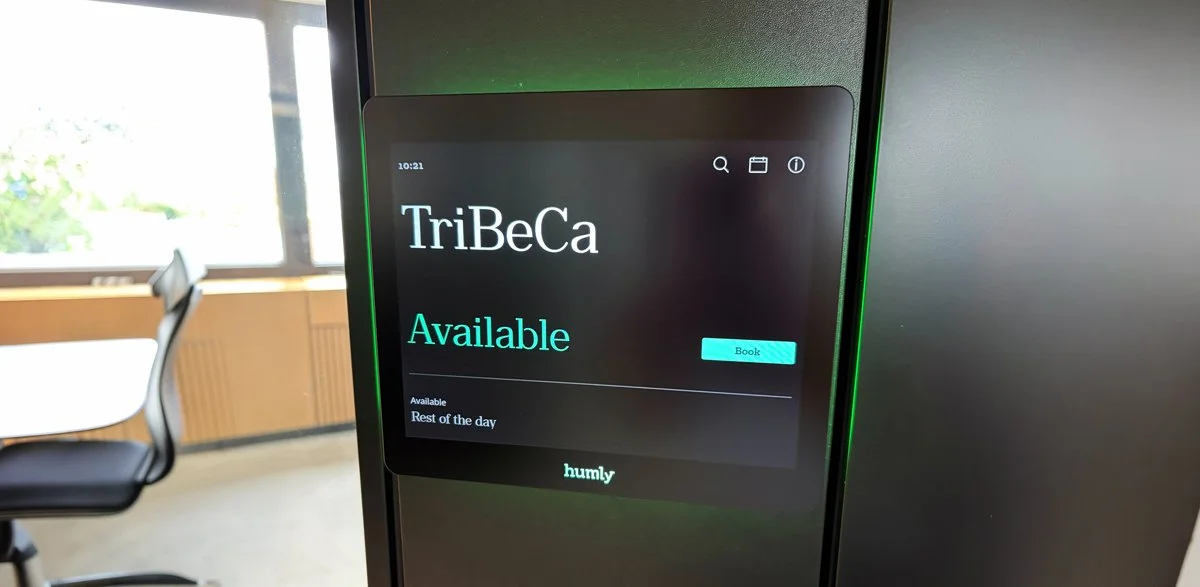
A conference room booking system is software that allows employees to centrally manage, reserve, and release meeting and conference rooms. It displays real-time room availability, prevents double bookings, and typically integrates with existing tools such as Microsoft Outlook, Microsoft 365, or Google Workspace.
Modern solutions go beyond simple booking. They cover the entire meeting process: from finding a suitable room and ordering catering to automatic cancellation in case of no-shows.
In short, a conference room booking system allows you to:
View and book rooms in real time
Automatically prevent duplicate bookings
Order additional services such as catering or technical support directly
Collecting data on actual space usage
Seamlessly integrate appointments into Outlook or Teams
If you also want to manage workstations digitally, you might want to check out our guide to the workstation booking system.
Why isn't a simple "
" Outlook appointment enough?
Many companies use Outlook's scheduling assistant to reserve rooms. This works for simple scenarios. But as soon as catering, hybrid attendance, or last-minute changes come into play, this solution reaches its limits.
Outlook alone only partially covers the meeting process:
Catering is ordered separately —usually by email, phone, or through another system
Setup and takedown times for the caterer are missing —the caterer has no buffer time to prepare
Changes aren't automatically synced —if the meeting is rescheduled, the caterer won't know
No usage data – You won't know which rooms are actually being used
The result: a high level of manual coordination, numerous sources of error, and frustrated employees and caterers.
Three Ways Companies Manage Conference Rooms
In practice, we see three typical setups among our customers. They differ primarily in the depth of their Microsoft 365 integration—and thus in terms of efficiency and susceptibility to errors.
Option 1: Outlook only; everything else manually
Rooms are booked through Outlook. Catering is handled separately via Excel spreadsheets, email, or phone. There is no central overview, no automatic confirmations, and no synchronization.
What works well:
Quick to put on
No additional tool costs
Rooms are visible directly in Outlook
Where the problem lies:
The catering process is entirely manual
If there are changes, everything has to be coordinated again
No setup or takedown time for the caterer
High error rate, high processing costs
Suitable for: Very small businesses with few rooms and infrequent use of catering services.
Option 2: Third-party system with an Outlook add-in
There is a separate booking system that includes an Outlook add-in. At first glance, it looks like a true integration: employees appear to be able to make bookings directly in Outlook, catering is included, and there are order summaries as well.
Technically, it works differently. Rooms are managed in the external system, not in Microsoft 365. When you book a room in Outlook, the add-in sends a request to the external system—and the room is added to the calendar as an attendee, not booked as a resource.
What works well:
Better user experience than Option 1
A catering shop and order summaries are available
Where the problem lies:
Two parallel systems must be kept in sync
Room availability may be inconsistent—the room is booked in the external system, but Outlook shows it as available
Limited compatibility with Microsoft Teams Rooms
Microsoft 365 licenses are not being fully utilized
Suitable for: Businesses that need a catering solution quickly but can live with the limitations.
Option 3: True bidirectional Microsoft 365 integration
This is the key difference. Rooms are managed directly as resources in Microsoft 365—not in a third-party system. Bookings, changes, and cancellations are synchronized in real time between the booking system and Microsoft 365, in both directions.
Specifically, this means:
A central data source: Microsoft 365 remains the leading system
No duplicate data entry: What happens in Outlook also happens in the accounting system—and vice versa
Catering runs in the background: Orders are automatically recorded, and confirmations are sent
Setup and teardown times are scheduled: The room is automatically reserved before and after the meeting without affecting the visible meeting duration
Full Teams Rooms compatibility: Hybrid meetings run smoothly
If the meeting is rescheduled, everything else is automatically adjusted: catering is rebooked for the new date, and previous orders are canceled
Suitable for: Companies that use hybrid work models, regularly utilize catering services, and use Microsoft 365 as their standard IT platform.
| Requirement | Outlook and Exchange | Microsoft Places | MazeMap Workplace with Microsoft 365 |
|---|---|---|---|
| Room Reservations in Outlook and Teams | Booking via Exchange Resources | Booking via Outlook, Teams, and the Places app | Book a room directly in Outlook using the MazeMap add-in |
| Room Management | As resources in Exchange Online | Exchange Resources plus the Microsoft Places Directory | Exchange Online remains the leading system for room scheduling |
| Changes and Cancellations | Within the Microsoft calendar environment | Within the Microsoft environment | Two-way synchronization between MazeMap Workplace and Microsoft 365 |
| Microsoft Teams Rooms | Part of the Microsoft ecosystem | Integrated directly into the Microsoft ecosystem | Compatible with Microsoft Teams Rooms |
| Check-in and Automatic Approval | Not part of a basic room mailbox | Automatic approval available with a supported room license | Automatic release via check-in or occupancy sensors |
| Usage Analyses | Basic Booking Information | Analysis of planned and actual occupancy; partially license-dependent | Combination of transaction and sensor data for land-use analysis |
| Catering and Additional Services | These usually have to be arranged separately | No dedicated catering ordering process is documented | Catering, equipment, ordering rules, and confirmations are directly integrated |
| Preparation and follow-up time | Must be organized manually | No specific catering process is planned | Are automatically taken into account when booking a room |
| Sensor and Building Integration | Requires additional systems | Supports Teams devices and built-in occupancy sensors | Integration with occupancy sensors, building automation, access control, and indoor navigation |
| User and Permissions Management | About Microsoft 365 | About Microsoft Places and Microsoft 365 | Microsoft Entra ID, SSO, and SCIM Synchronization |
Requirements for a Room Reservation System for Businesses
For large companies, a simple calendar booking system is often not enough. The room booking system must reliably support multiple locations, different user groups, and an existing Microsoft 365 infrastructure.
When making your selection, please pay particular attention to the following requirements:
Will rooms continue to be managed as resources in Exchange Online?
Are bookings, changes, and cancellations synchronized in both directions?
Is the system compatible with Microsoft Teams Rooms and Room Panels?
Can multiple buildings and locations be managed centrally?
Can users, roles, and permissions be synchronized using Microsoft Entra ID?
Can unused rooms be automatically released via check-in or sensors?
Can booking data and actual occupancy data be analyzed together?
Can catering, equipment, and setup and cleanup times be included in the reservation?
What additional Microsoft and vendor licenses are required?
Which data is stored in Microsoft 365 and which is stored in the external system?

Features a good conference room booking system should have
Not every feature is relevant for every business. However, you should definitely check out these ones:
1. Real-time availability display: The status of each room is immediately visible—including size, amenities, and location.
2. Outlook and Microsoft 365 integration: Employees can schedule appointments in their familiar environment. Make sure to use two-way synchronization, not just a simple add-in.
3. Auto-Checkout for No-Shows If no one shows up for the meeting, the room is automatically released after a set amount of time. This significantly reduces "ghost bookings."
4. Catering and Equipment Reservations Catering, technical equipment, and furniture can be booked directly along with the room reservation. Ideally, this should include a shopping cart feature and automatic confirmations.
5. Setup and cleanup times The caterer needs time to prepare and clean up. A good system automatically reserves these time slots.
6. Compatibility with Microsoft Teams Rooms Hybrid meetings are the norm. Your booking system must be compatible with Teams Rooms and standard room displays.
7. Usage Analytics and Dashboards Which spaces are actually needed? Where are the bottlenecks? Where are the vacancies? Without data, you’re making decisions in the dark.
8. Sensor Integration Optional, but valuable: Sensors detect whether a reserved room is actually being used. This allows no-shows to be identified automatically.
Selection criteria: How to find the right system
Before you compare providers, consider the following questions:
How many spaces do you have? Three spaces at a single location, or a hundred spread across multiple buildings?
What email system do you use? Microsoft 365, Google Workspace, or something else?
How important is catering? Daily orders or just occasionally?
What hardware is being used? Teams Rooms, external room displays, sensors?
Who should be able to make reservations? Just administrative staff, or all employees?
What reporting requirements do you have? Is a simple overview sufficient, or do you need detailed utilization data?
With clear answers to these questions, you can quickly narrow down which providers are even worth considering.
Common mistakes during implementation
Tool first, process later. Anyone who buys a system without first thinking through the booking process is building digital structures on top of old problems. First, define how bookings should be made—and then look for the right tool.
The depth of integration is often underestimated. Many providers’ websites mention “Outlook integration,” but what that means in practice varies widely. Ask specific questions: Is the room booked as a resource, or are participants invited? Is the synchronization bidirectional?
No training for employees A new system will only be used if it’s clear how it works. Plan for onboarding and short video tutorials right from the start.
Treat catering and booking as separate processes. In many companies, catering is the real key to efficiency. If the catering process is still handled manually, you’re only halfway there.
Conclusion: Which system is right for you?
A conference room booking system is no longer just a "nice-to-have." In companies with hybrid work models, it determines whether meetings run smoothly or end in chaos.
The most important decision here is: How deeply should the system be integrated into your existing IT infrastructure? A superficial solution creates new problems. True bidirectional Microsoft 365 integration takes the work off your hands—and, as a bonus, provides the data you need to better plan your space in the long term.
Many companies only realize, once they are up and running, just how much the level of integration affects their day-to-day workload.
If you'd like to see what a two-way Microsoft 365 integration —including Catering and Teams Rooms—looks like in practice, we'd be happy to show you in a quick demo.
Frequently asked questions
-
The two terms are usually used interchangeably. The term "conference room booking system" is more narrowly defined and refers only to meeting and conference rooms. A room booking system, on the other hand, can also cover other types of spaces, such as phone booths, training rooms, or event spaces.
-
For very small setups with three to five rooms and no regular catering, Outlook is sufficient. As soon as hybrid work, catering, or multiple locations come into play, a dedicated booking system quickly becomes worthwhile.
-
There are two levels: superficial integration via an add-in (room as a participant) and true bidirectional integration (room as a resource, with data synchronized in both directions). Ask vendors specifically how they are integrated—the differences are significant in practice.
-
Pricing models vary widely: per user, per room, or as a flat rate. Per-room models are usually more cost-effective for companies with many employees than per-user licenses.
-
Yes—but only if it offers true Microsoft 365 integration. Third-party systems that invite rooms as participants often have compatibility issues with Teams Rooms.
-
Modern systems offer this as a standard feature. Make sure the catering module includes automatic confirmations, setup times, and cancellation logic—otherwise, you’ve just shifted the manual work to someone else.
Latest Posts

Workplace Management in the Hybrid Office: What You Really Need
Workplace management is no longer a niche topic. For companies with hybrid work models, it has become a core operational task—and, at the same time, one of the most complex.

Digital parking space management: How to finally make efficient use of unused space
For many employees, finding a parking space in the morning is a daily source of stress—even though there is often unused space available. The problem is usually not a lack of parking spaces.

Desk Sharing in the Office: Why It Often Fails—and How to Make It Work
Desk sharing —that is, the flexible sharing of workspaces in the office—has become established in German companies as a response to hybrid work models.
Are you
curious?
Contact us today using the form. We’ll get back to you shortly.
Or book a demo appointment directly :
Free & no obligation

Tailored specifically to your situation, rather than a standard demo
Book a no-obligation demo today!

Lisa Pfützner
Workplace Strategist

Give us a call
+49 69-566086786